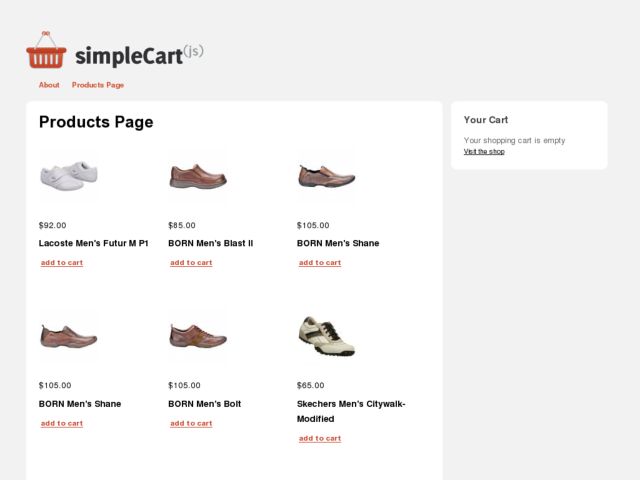

SimpleCart(js) WordPress Theme By Anonymous, Theme Type: E-Commerce , free trial: available
After putting this SimpleCart(js) wordpress theme together for the WP E-commerce contest. It is a port of the simpleCart(js) theme from the Wojo Group and was changed quite a bit due to its usage of Thematic and WP E-commerce, but I wanted to give credit to the creator, even if there are very few elements left from the original. One important note for this version, there is no link from the products on the homepage to the product info page, future versions will include one. Also, it should be fairly easy to add in there if you know what you’re doing.
SimpleCart(js) is a simple, attractive, and flexible WordPress theme that taps into the power of both Thematic and WP E-commerce. Features include AJAX cart functionality, a grid layout for products, and a flexible color scheme, easy to swap out images and completely customize the theme to your needs.
Download SimpleCart WordPress Theme
You will also need to grab a new WP E-commerce theme to be activated if you want your products to appear in a grid, similar to the demo.
Download SimpleCart(js) 0.6
Download SimpleCart(js) WP E-commerce Theme
Download Thematic
SimpleCart install
To install, you need to install the WP-Ecommerce plugin, add the WP E-commerce theme to that plugin’s themes directory, then install both Thematic and the normal SimpleCart(js) theme to your regular theme folder.
SimpleCart Configure
You will want to set the page ‘products-page’ as your homepage in WordPress. To do that, go to “Settings > Reading” and tick the radio button for ‘A Static Page’ and select the products page in that list, then save.
Wopus:SimpleCart是一款免费的电子商务主题,适合企业产品展示和购物类型的网站。
安装方法:
首先将基本主题Thematic与simpleCart同时放到themes文件夹中,并安装启用WP E-commerce插件。